
CopayGo Health Plan

Did you know that authenticating via Availity gives you access to all the private information on our website? Login via Availity

CopayGo Health Plan

Last Updated: Friday, October 02, 2026

What is CopayGo?

CopayGo is Highmark’s alternative health plan, featuring a national two-tiered network. Effective January 1, 2027, it will offer two plan designs:

  • Non-HDHP: True copay-only plan with no deductible and no coinsurance for in-network care.
  • HDHP: Standard deductible applies; once met, members transition to fixed copays for in-network care.

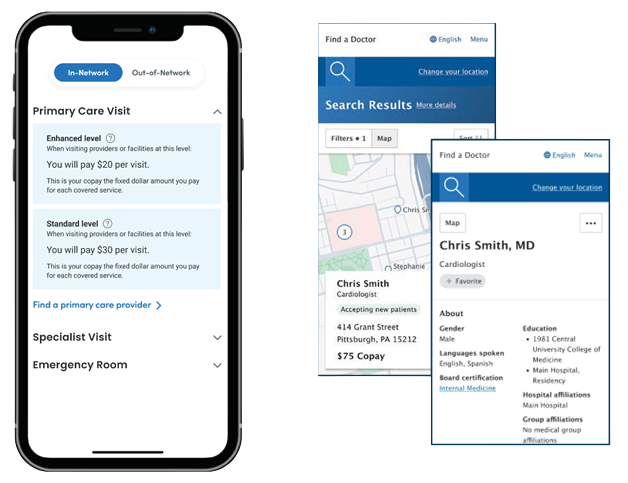
Providers are designated "Enhanced" or "Standard" based on rankings determined by the Blue Cross Blue Shield Axis® Provider Insights, a national dataset that measures quality, appropriateness of care and cost/efficiency at the individual provider level. Digital tools in the My Highmark member portal will offer greater cost and quality transparency.

List of Enhanced and Standard Providers

The list below includes individual National Provider Identifier (NPI) numbers and names of providers indicating designation as Enhanced or Standard.
2027 List of Providers


To get the information you need to take the correct cost-share at the point of service:

  • Submit a 270 inquiry, OR search the member in Availity Essentials
    • Enhanced and Standard CopayGo tiers and costs will return on 271 or in Availity 
  • Check the individual provider's designated tier (Enhanced or Standard) in the list above
  • Apply the correct cost-share


In Highmark's Payer Spaces in Availity:

  • Hover over “Patient Registration” and click “Eligibility and Benefits Inquiry” (E&B). 
  • Look for “CopayGo” plan in the Member E&B detail. The member E&B search can be initiated using any one of the following search options:
    • Member ID/Policy Number + Date of Birth
    • Member Last Name + First Name + Date of Birth
    • Member ID/Policy Number + Member First Name + Last Name


A 270 electronic inquiry, will return a 271 response with corresponding cost-shares for your provider group, but that transaction alone won’t tell you which providers in your office are Enhanced or Standard. If you don't know whether the provider is designated "Enhanced" or "Standard," you can check provider designation (Enhanced or Standard) in the list above.

Provider offices should take the cost-share that corresponds with the individual provider.

CopayGo member ID cards will also list Enhanced and Standard cost-share amounts (PCP, Specialist, and ER.) Members can show office staff real-time information in their My Highmark app as proof of eligibility and provider Enhanced or Standard designation, as well as what cost-share should be taken. Cost-share will vary based on the members’ actual benefits.

CopayGo features a national provider network that will tier individual primary care and specialty types of providers at the practitioner level, including:


  • Cardiothoracic Surgery
  • Cardiovascular Disease
  • Endocrinology
  • Gastroenterology
  • Nephrology
  • Neurology
  • Obstetrics & Gynecology
  • Oncology
  • Ophthalmology
  • Orthopedics
  • Otolaryngology
  • Pediatrics
  • Primary Care
  • Pulmonology
  • Radiation Oncology
  • Rheumatology
  • Surgery
  • Urology
  • Vascular Surgery
   

Members can search for Enhanced and Standard providers and associated cost-share in their My Highmark member portal before they visit your office.  CopayGo requires greater member engagement with the digital tools in their My Highmark portal app to identify providers and associated cost-share. CopayGo enables members to more actively weigh the value of care options and puts the onus on members to “know before they go.” The digital aspect of the plan supports value transparency and allows members to work with provider offices to ensure the correct cost-share is taken.