


Evolent Oncology Auth Submissions: Managing the New Process
Published Date: Fri, May 15, 2026
Highmark is aware that some of you have experienced initial challenges when submitting prior authorization requests for certain Evolent-managed oncology services.
While most of these challenges are resolved and others are being actively investigated, we understand there may still be aspects of this new process that cause uncertainty. We want to assure you that the underlying process of submitting oncology-related prior authorization requests in the Availity Essentials portal is working as intended, even if certain notifications or statuses appear different from what you might typically expect.
Common Concerns Identified
- No Authorization Required: Certain medical and radiation oncology services may not be managed by Evolent or may not require an authorization at all, including, but not limited to:
- Services covered by a self-funded Administrative Services Only (ASO) plan and/or services unrelated to cancer diagnoses
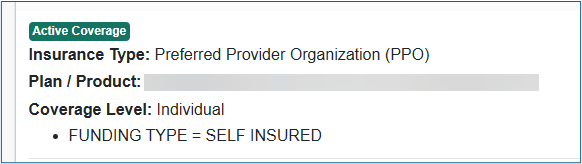
- To verify if your patient is covered by a Highmark self-funded ASO plan, navigate to Patient Registration in Availity and click Eligibility and Benefits Inquiry from the drop-down menu. Enter the patient’s information and click Submit. In the patient's plan information, you will see “Funding Type = Self-Insured” to indicate the patient has an ASO plan.
- Authorization Canceled: In situations where some codes are jointly managed by Highmark and Evolent, you might see an authorization request initially appear as "canceled.”
- This is not a denial. Instead, it indicates that the request has been internally rerouted to Evolent, who will then create a new auth request for the services they manage. You can view the status of this auth in Availity.
- Member Not Found: If you receive a “member not found” message in Evolent’s CarePro portal after submitting an authorization request, it could be due to a known error occurring periodically. If you have confirmed that you are entering the information correctly, reach out to Highmark’s Clinical Services team for help submitting.
Continue to submit all oncology authorization requests through Availity for them to be routed appropriately. You can track the status of all your auth requests in Availity, just as you would for any other authorization request.
We understand challenges like these can be potentially disruptive in your busy office and we remain dedicated to collaborating with Evolent to refine and optimize the authorization workflow.
For questions related to prior authorization submissions or member eligibility, continue to utilize our Provider Live Chat feature within Highmark’s Payer Spaces in Availity.
Additional Resources
- Evolent’s Highmark page
- Includes Provider FAQs
- Evolent to Manage Oncology Prior Authorization Review
Quick Info
Never miss out on what matters. Subscribe to our emails and stay informed.